스샷 먼저.. ㅎㅎ
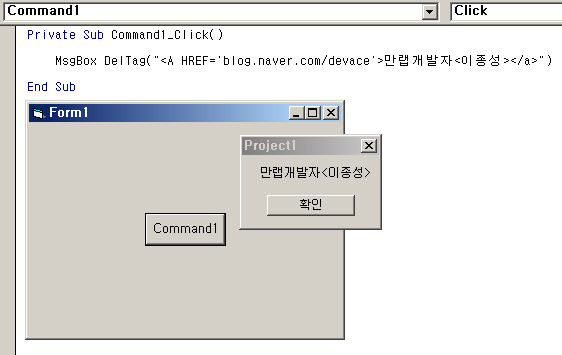
Function DelTag(mystr As Variant) As String

'태그제거 함수

    If IsNull(mystr) = True Then
        'Null 처리부분
        DelTag = ""
        Exit Function
    End If

    Dim Pointed_Char As String
    Dim Switch_Value As Boolean
    Dim Result As String
    Dim Pnt_of_Str As Integer

    Switch_Value = True

    For Pnt_of_Str = 1 To Len(mystr)
        '전체 글자 갯수 만큼 루프를 수행
        Pointed_Char = Mid(mystr, Pnt_of_Str, 1)

        '한글자씩 처리한다
        If Pointed_Char = "<" Then

            If (Asc(Mid(mystr, Pnt_of_Str + 1, 1)) >= 65 And
                Asc(Mid(mystr, Pnt_of_Str + 1, 1)) <= 122) Or _
                Mid(mystr, Pnt_of_Str + 1, 1) = "/" Then

                '첫번째 글자가 영문 알파벳 이거나 "/"이면 스위치는 false
                 Switch_Value = False
            End If

            If (Asc(Mid(mystr, Pnt_of_Str + 2, 1)) >= 65 And
                Asc(Mid(mystr, Pnt_of_Str + 2, 1)) <= 122) Or _
                Mid(mystr, Pnt_of_Str + 2, 1) = "/" Then

                '두번째 글자가 영문 알파벳 이거나 "/"이면 스위치는 false
                Switch_Value = False
            End If

        End If

        If Switch_Value = True Then
            '스위치 값이 true일때만 result에 문자를 더해나간다
            Result = Result & Pointed_Char
        End If


        If Pointed_Char = ">" Then
            '닫히는 꺽쇄 괄호를 만나면 무조건 스위치값은 true
            Switch_Value = True
        End If
    Next Pnt_of_Str

    DelTag = Result

End Function
[출처] http://blog.naver.com/devace?Redirect=Log&logNo=20063206854
 [c#] 정규표현식을 이용한 문자열에서 태그 제거함수

