Contents

System/OS
2017.02.07 23:03

Enable Safari Hidden Debug Menu in Mac OS X

조회 수 9036 댓글 0
Atachment
첨부 '3'
?

단축키

Prev이전 문서

Next다음 문서

크게 작게 위로 아래로 댓글로 가기 인쇄
?

단축키

Prev이전 문서

Next다음 문서

크게 작게 위로 아래로 댓글로 가기 인쇄

Enable Safari Hidden Debug Menu in Mac OS X

- 맥 OS X 에서 사파리 브라우저 숨겨진 메뉴 활성화 방법
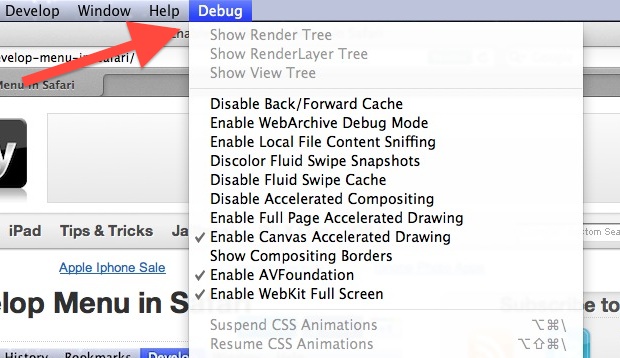

debug_menu_safari01.jpg

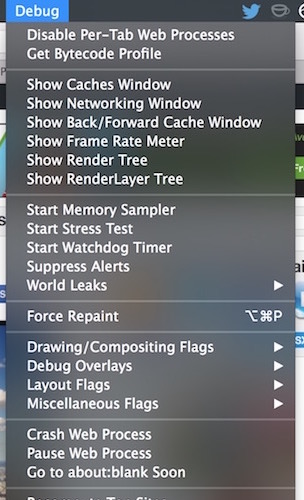
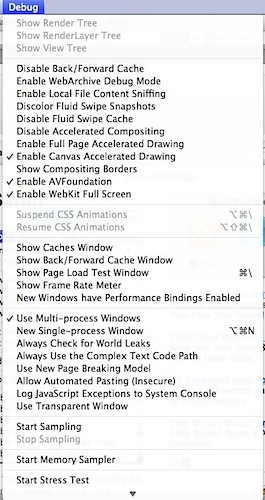
Safari has a hidden “Debug” menu that offers some additional features for debugging the browser, including stress and load tests, sampling, javascript error logging, the ability to intentionally crash a page, and more. Intended for Safari developers, the Debug menu is different from the Developer menu, which is geared more at web developers, although there are a few options in the Debug menu that general web developers would find useful as well, notably advanced cache choices and CSS animation controls. If this sounds confusing, just enable both of them and poke around and you’ll quickly see the differences.

Here’s how to enable the hidden Debug menu in Safari for Mac OS X with the assistance of a defaults command string in the terminal.

How to Enable Safari’s Hidden Debug Menu on Mac

This works in all versions of Safari in nearly all versions of OS X, from all modern releases to most prior versions as well:

  1. Quit Safari in OS X
  2. Launch the Terminal from /Applications/Utilities/ and enter the following defaults write command exactly:
  3. defaults write com.apple.Safari IncludeInternalDebugMenu 1

  4. Hit return, then relaunch Safari

The “Debug” menu will be visible to the far right in Safari’s menubar choices.

debug_menu_safari02.jpg

If you want to disable the menu, go back to the Terminal and type:

defaults write com.apple.Safari IncludeInternalDebugMenu 0

Again you will need to relaunch Safari for changes to take effect.

We’ve poked around in the Debug menu before to stop auto-refreshing in Safari by disabling multi-process windows, that is no longer necessary with the latest version of Safari, however.

debug_menu_safari03.jpg

Generally aimed at developers, Safari debugging, and web workers, the Debug menu has many features that can be useful to more advanced Safari users as well.


?

  1. 모바일 프로그래머가 갖추어야 할 필수 역량

    Date2017.02.16 CategoryEtc Byhooni Views7816
    Read More
  2. 무료로 HTTPS 적용하기 (Lets' Encrypt)

    Date2017.02.16 CategorySystem/OS Byhooni Views7587
    Read More
  3. [android] 초간단 HTTP, POST 전송 샘플

    Date2017.02.16 CategorySystem/OS Byhooni Views7165
    Read More
  4. Enable Safari Hidden Debug Menu in Mac OS X

    Date2017.02.07 CategorySystem/OS Byhooni Views9036
    Read More
  5. Enable the Develop Menu in Safari

    Date2017.02.07 CategorySystem/OS Byhooni Views5404
    Read More
  6. [ios] 동영상 플레이어 샘플 (for Remote Url)

    Date2017.02.07 CategoryDevelop Byhooni Views9513
    Read More
  7. [ios] 동영상 플레이어 샘플 (for Local File)

    Date2017.02.07 CategoryDevelop Byhooni Views8405
    Read More
  8. XML, JSON, BSON, MSGPACK 장,단점 비교

    Date2017.01.11 CategoryDevelop Byhooni Views7152
    Read More
  9. [ppt] 정보보호관리 발표내용 #2

    Date2016.12.08 CategoryPPT Byhooni Views5031
    Read More
  10. ISMS 인증기준 – 정보보호대책 (시스템개발보안)

    Date2016.12.01 CategoryEtc Byhooni Views4640
    Read More
  11. [ppt] 정보보호관리 발표내용

    Date2016.11.30 CategoryPPT Byhooni Views3969
    Read More
  12. 웹 보안 논문 주제 2016

    Date2016.11.28 CategoryEtc Byhooni Views0
    Read More
Board Pagination Prev 1 ... 6 7 8 9 10 11 12 13 14 15 ... 99 Next
/ 99